
Rank Math SEO: A Practical Guide for WordPress Creators
If you run a WordPress site and care about traffic, you need a solid SEO plugin. Rank Math is one of the most popular options today, combining ease of use with powerful on‑page and technical SEO tools in a single package.
What Is Rank Math SEO?
Rank Math is a WordPress SEO plugin that helps you optimise your posts, pages, and products so they can rank better on search engines like Google. It launched in 2018 and has grown to over one million active installations, which says a lot about how quickly it has been adopted by the WordPress community.
The plugin calls itself the “Swiss army knife of WordPress SEO” because it bundles features that many site owners used to get from multiple plugins: on‑page analysis, sitemaps, schema, redirects, link suggestions, and more.
Installing Rank Math on Your WordPress Site
Getting Rank Math running takes just a few minutes:
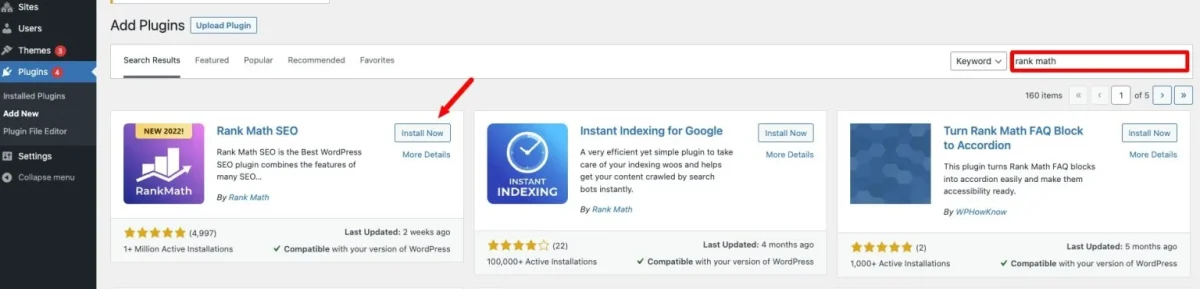
- Log into your WordPress dashboard and go to Plugins → Add New.
- Search for “Rank Math SEO” and click Install, then Activate.
- After activation, WordPress will show the Rank Math setup wizard or you can access it from the Rank Math menu in the sidebar.
- Create a free Rank Math account and walk through the wizard to set basic SEO options, sitemaps, and Google services.
Once the wizard is done, you can leave the default configuration or dive into advanced options, depending on your experience level.

Standout Features in Rank Math (Free)
The free version is packed with tools that cover most SEO needs for bloggers, businesses, and stores:
- Clean, intuitive dashboard where you can toggle modules on or off and see key SEO stats at a glance.
- On‑page SEO score (0–100) shown right in the editor, with real‑time suggestions for improving titles, content, and metadata.
- Built‑in XML sitemaps so you don’t need a separate sitemap plugin.
- Integration with Google Search Console and Google Analytics so you can see impressions, clicks, and keyword data directly inside WordPress.
- Image SEO options that automatically add alt text and titles to images, which is especially useful for content‑heavy sites.
- Internal link suggestions to help you build stronger site structure without manually hunting for old posts to link.
- Local SEO and Knowledge Graph support so brands and local businesses can improve how they appear in search results.
- Redirection manager (301/302), 404 monitor, and meta title/description templates for posts, pages, and custom post types.
- WooCommerce SEO enhancements so product pages are better optimized out of the box.
For most solo creators and small businesses, this free feature set is enough to meaningfully improve search visibility.
Premium Features: When to Upgrade
Rank Math Pro and higher tiers are aimed at users managing more volume or needing deeper insights:
- Keyword rank tracking for the last 12 months, so you can see how your target phrases move over time.
- Google Trends and Google Analytics 4 integration to help you understand demand and performance.
- Advanced Schema Generator with presets for many content types (articles, products, FAQs, and more).
- Expanded Content AI features with more credits for AI‑driven suggestions around keywords, headings, and topics.
- Extra WooCommerce SEO options and a podcast module for sites that publish audio content.
Pricing is tiered: Pro for single‑site owners, Business and Agency for people managing many websites.
Everyday Workflow: Using Rank Math on a Post
Rank Math integrates seamlessly with the WordPress block editor.
- When you create or edit a post, click the SEO score icon in the top‑right corner.
- Set your focus keyword(s); the plugin will immediately check your content and give actionable suggestions.
- Work through the checklist: improve headings, refine meta description, adjust keyword usage, and add internal links.
- Aim for a green score (80+), but don’t sacrifice readability for the number—use the guidance, not the score, to shape your content.
If you use a visual builder like Divi, Rank Math’s controls appear inside the builder as well, allowing you to handle SEO without leaving your design workflow.
Rank Math vs. Yoast: Quick Perspective
Yoast has been the default SEO plugin for many years, but Rank Math has become a serious challenger:
- Both offer simple setup wizards and core features like sitemaps and meta templates in their free versions.
- Rank Math’s free edition includes more advanced tools (like detailed keyword analysis and built‑in analytics) than Yoast’s free tier.
- Rank Math Pro is generally cheaper than Yoast’s comparable paid plan, which matters if you run multiple projects or client sites.
Ultimately, the “better” plugin depends on your preferences and existing workflows, but Rank Math gives you a lot of modern functionality for less money.
Is Rank Math Right for Your Site?
If you want:
- A modern SEO plugin that feels lightweight but feature‑rich
- Strong on‑page guidance without needing to be an SEO expert
- Integrated analytics, link suggestions, and schema in one tool
…then Rank Math is absolutely worth testing on your WordPress site. With the free version alone, you can significantly tighten up your technical and on‑page SEO, and upgrade later if you need deeper tracking or multi‑site support.
5 Step Strategy For Successful Blogging

‘5 Step Strategy For Successful Blogging’ is a comprehensive guide for anyone who wants to start and grow a successful blog. It covers the essential steps of creating a blog strategy, such as choosing a niche, identifying your target audience, conducting keyword research, planning your content calendar, and monetising your blog.
Get a copy of ‘5 Step Strategy For Successful Blogging‘ here!